Gadzooki
GadzookiSafari Browser for Windows Released: Major Bugs and Other First Impressions
Posted by Sophia as Apple, Gadzooki News, Mac, Software, The Web, WindowsAmidst all the cries of ecstasy over Mac OS X Leopard at the WWDC07, we have a little surpsrise: Safari is released for Windows. It’s a public beta, to be exact.
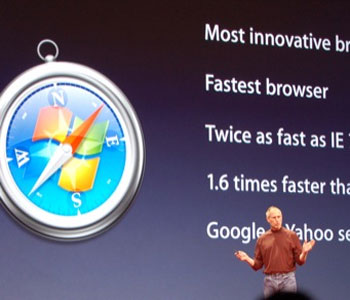
That’s great news, coming not from someone who wants Apple to take over the world, but as a web designer who wants to test web pages in all kinds of browsers. I haven’t been able to do that on Safari since it’s always been released on the Mac exclusively.
It’s also a great idea to discover a new browser every once in a while. Find out which one has features that best suit your taste. After all, Steve Jobs claims it’s twice as fast as Internet Explorer and 1.6 times as fast as Firefox.
Problem is, right after downloading and installing Safari for Windows I ran into two major problems right away.
Gibberish Text on Menus and Bold Text on Websites
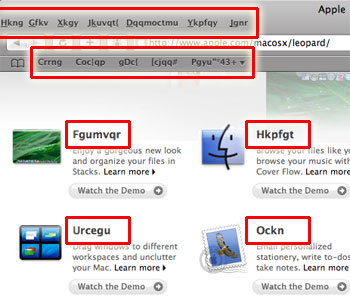
First thing I noticed was that all the titles on the menus and Bookmarks Bar were gibberish. I also noticed this on the Apple Start page and other pages which used the Lucida Grande typeface in bold.
It took me two tries to fix the problem based on suggestion at the Apple Forum for Safari 3 Public Beta for Windows. The first one involves renaming the Safari.resources folder Safari’s Program Files folder, running Safari ’til it crashes, rename it back, and re-running Safari:
This is what I did and it worked:
1. Copy the fonts from Safari.resources to windows
2. Delete the Safari.resources directory
3. Try starting Safari.. it won’t and will show the window of ‘reporting error to windows’.
4. Double click on the safari installer file and select the repair option.
5. Yippee!
However, this did not work for me. The second method, though, which requires renaming the Lucida Grande font file extentions in the Safari.resources folder, worked:
Have you all tried the solution I’ve seen elsewhere: rename the two *.ttf files in Safari.resources to *.ttf.1?
Source: Re: Safari 3 beta for Windows. Text is random letters. [cap included]
Blank Text on Websites
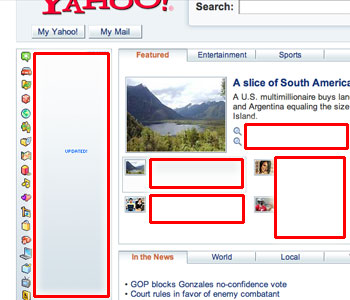
Another problem I encountered with Safari is that many web pages have blank text in them. This is most likely caused by having too many fonts installed and some missing keys in the program’s Fonts.plist file, which is located in the Application Data (hidden) folder. Adding the core fonts (like Verdana, Tahoma) to the file seems to bring things back to normal.
A Safari developer is also encourages us to upload our own .plist files so they look at the problem more carefully.
More First Impressions
It’s fast. No benchmarks here; Steve already showed that at the keynote. It just feels fast. Try GMail with it and you’ll be impressed. That’s how AJAX is supposed to work! (+2)
The fonts look weird. The larger and thicker words look like they were painted in watercolor and started to bleed on paper. Several others agree. I’m not too sure why the fonts on Safari render differently compared to other native Windows apps, but I can’t complain—read the next item. (-1)
Aqua? Apple has every right to incorporate its interface into Windows ports of their software, but is it fair? Macs almost always have a consistent look so why can’t they give in to the default Windows look? Probably ’cause we all want a piece of Mac goodness on our PCs (especially those who want to test how websites look across platforms!). But iTunes is a little more in sync with the Windows look, so they had better improve on that aspect. Despite all these, the dialog animations in Safari are a wee bit delightful. (0)
Auto-complete for URLs, but no other domain shortcuts. When I type in “i”, “imdb.com” appears. When I type in “google”, a .com is appended. This is a great anti-phishing feature. But, of course it can’t guess everything I’ll be typing in. I’d rather use the Ctrl+Enter, Shift+Enter, and Ctrl+Shift+Enter to automatically append .com, .net, and .org to addresses, as in Firefox and its cousins. (0)
Resizable text areas. Just like Netscape, you can resize text areas so you can see what you’re typing. (+0.5)
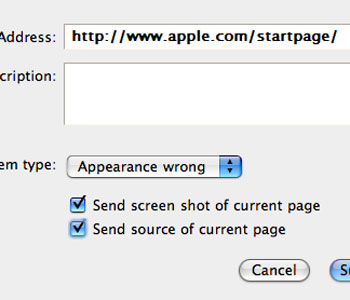
Helpful bug reporting features. Clicking on the bug icon brings up a bug report dialog which lets you describe the problem in detail, identify the type of bug, and even send a screenshot and page source to the developers. That can only be topped by quick improvements on the software, which I hope will happen. (+1)
Incomplete Tab Browsing and Middle Clicking. I’m used to the Firefox way of opening links that open in new windows are forced to open in new tabs. Safari doesn’t do that, and when you’re inside GMail, that gets annoying. Even a right-click on a link in an email leads to a new window. You can solve this by dragging the link to the tab bar, but who wants to do that? Moreover, I’d like to close tabs with my middle mouse button—it doesn’t help that the close button is on the left side (as it usually is on the Mac but not on Windows). (-1)
Firefox is still more intuitive. Download behavior is a little different: it’s sent to the Desktop (or some other location) by default, and you can only change this if you right-click and select “Download Linked File As…“. Generally speaking, you’ll finds lots more of those quirks, and you probably won’t ditch Firefox for that. (-2)
Feed reading looks nice. Safari displays feeds in a very friendly manner—much like Internet Explorer 7. Why Firefox can’t catch up I don’t know. But of these three, none carries more structure for advanced users, unlike Opera and Flock. (+1)
Overall score: 0.5.
The Verdict
Web developers and other techies will consider Safari on Windows this a must-have, especially with the release of the iPhone on June 29th, since the same Safari engine will be running on it.
For the rest of the world, give it a whirl—if you have the time and the system resources. Always be on the lookout for security threats, though.
Note that this is still a Beta. Expect lots of bugs, but also expect them to be fixed in due time.
Aside from the fairly obvious fact that Apple is aggressively expanding market shares for its products (I hope iChat is next!), it’s safe to say that the browser wars are back!
Related Articles
Software and Security
Silverlight – Is This Going To Be Web 3.0?
It’s not that often when a technology comes along that leaves me amazed. You know, the sort of thing when you look at it you think “wow, this is good. Not just good, but perhaps is going to make a difference to websites in a very real way in the near future”. [...]
Read onMore Software Features
Hardware and Gadgetry
The 3G iPhone
I’ve had 3G on my Nokia N95 enabled since I got it – which is about a month or two ago now. I was thus surprised to learn that the iPhone didn’t include this much faster way to connect to the Internet. Consequently, I wasn’t exactly surprised when Steve Jobs big announcement turned [...]
Read onMore Hardware and Gadget Features
Gaming
GamerDNA.com - What Are You Made Of?
GamerDNA.com, the social platform for videogame identity and discovery, today announced a milestone 500,000 quizzes have been completed on the site by gamers looking to define their gaming preferences, interests and unique gaming identity. To celebrate the initial success of the quiz system, GamerDNA will further expand their gamer identity platform in the coming months [...]
Read onMore Gaming Features
Automotive
GTbyCITROËN: Where Real And Virtual Meet
It’s not often that a car is made especially for a game - which makes the GTbyCITROEN really rather special indeed. It is by no means a standard production car anyway, but this amazingly futuristic vehicle only exists in virtual space so far. It is going to be available for download for the [...]
Read onMore Automotive Features
- Andrew G.R
- Ben
- David
- Dummy Geek Gurl
- Ia Lucero
- Jackzooki
- J. Angelo
- Jaren
- Jhay
- Jim
- Mr Butterscotch
- Quimby
- Phillip
- Rogue
- Sir Tech Agnostic
- Xai

SUBSCRIBE
CATEGORIES
SPONSORS
PARTNERS
- Projection Screen
- USB Duplicator
- Audio Video
- Computer Cables
- TV reviews
- online backup for business
- Online Shopping
- Get a Free Mobile Phone
- Nintendo Wii Console
- DIRECT TV Deals from DIRECTV
- Computer Parts
- Cell Phone Accessories
- gps tracking
- spy software
- HP Printers
- blog advertising is good for you
RESOURCES
- 901am
- Audival
- Blog Herald
- Blog Network Watch
- Blog Search Engine
- Bloggy Award
- Business Logs
- Cutline
- Jack Of All Blogs
- Links
- Performancing
- Spy Gadgets
- Pod Basket
- Tubetorial
- Wisdump


10 Responses
jhay
13|Jun|2007Never had the problems you mentioned when I installed Safari on my Windows machine. Kinda strange really.
The only problem I found out so far is that I can’t access ‘https’ sites like AdSense with Safari.
You’re right though, the browser wars are back!
ia
13|Jun|2007I still find a few sites with display problems.
Https? That’s odd. I think that one’s working with me (saw a padlock icon from time to time).
J. Angelo Racoma
13|Jun|2007Having resizable input fields is a great idea. But it tends to break sites if you set it wider than you’re supposed to. Like this comment entry field, for instance. I just set it a bit wider than Gadzooki’s middle column, and the entire middle column runs into the right sidebar.
I still dig Safari, though.
Welcome to the dark side.
Fire Eye'd Boy
13|Jun|2007Safari on Windows looks terribly out of place, not to mention, it breaks big time on Vista. This is even worse than the first IE7 public beta
One thing though, I read somewhere that this Safari iteration is already based on Carbon (objective C); similar to QuickTime, hence the gel buttons, scrollbars, etc. It takes a little getting used to, but I think it works fine as is, and that’s the whole point of porting Safari over to Windows - porting over the Mac experience
J. Angelo Racoma
13|Jun|2007Here’s an interesting take on the font rendering, from Joel on software.
Also, Safari isn’t even Aqua. It’s brushed-metal. And if you’ve been working on Macs for long, you would realize it’s not always a consistent interface (it’s Aqua vs. Brushed Metal). And it’s not just the look, but also how the windows and applications act and feel.
iTunes had a familiar Windows look, at least up to version 6. When Apple came out with Version 7, the look suddenly switched to a brushed metal look.
ia
13|Jun|2007I wanted to point out that I’m a bit confused by the Aqua vs. dark gray look they have on iTunes and Safari, etc. (Why is Safari darker, but with Aqua buttons?) But I couldn’t really draw a conclusion since these were all Windows products. But, yeah, we should see more consistency. Leopard is supposed to fix that but, how about the Windows versions?
For the record, the gray look of Apple is getting boring. And on Safari, it looks too dark (and not in the high-contrast, light on dark, command-line way) compared to Firefox and other browsers.
As for resizable text areas, I don’t mind. You can always scale it back down when you’re done typing.
The Real Deal With Safari’s Font Rendering by Gadzooki
13|Jun|2007[...] said about the high points and low points of Safari, particularly the Windows port. Ia recently reviewed it here, and gave it a dismal 0.5 rating (meaning it’s more or less neutral, leaning a bit to the [...]
Fire Eye'd Boy
14|Jun|2007Right on. Mac OS X Tiger is probably the worst HIG implementation I’ve seen - I prefer the Aqua/striped interface look the most. Brushed metal is so late 90’s, and grey (iTunes 7) is just too drab (J - isnt it that iTunes for Windows has always been brushed metal since the first version? The grey + bluish non-Aqua buttons only came in at version 6/7).
Windows Vista comes to a very close second when it comes to HIG quirks. Somebody has listed them down so I won’t go doubling the wasted webspace
at least, all Windows 2000 windows looked the same
DM
21|Jun|2007It looks pretty fast but to say that it is twice (or 1.6) faster than ie humm, I’m not sure at all about that. Cannot log into my Yahoo mail without getting an error though. Same error when I try with Hotmail. Well, it’s a beta version I guess they will fix these bugs.
Phil Blancett
31|Mar|2008Its good but I can’t use it since the Dark Silver tabs are unreadable. You would think they would allow for color picking if they are going to use a color like that to begin with.
Who wants to strain all day?
Leave a reply