
I had always abhorred spreadsheet software; more so basic accounting. But it was not until I had started to live a life of my own did I realize that there is a reason why accounting is a cornerstone in the corporate world. Yet even though I needed to account for my budget, payments schedules, and all that dizzying “adult stuff.” I never, ever, ever could take to Microsoft Excel. Not even OpenOffice Calc could make me feel better about blank cells that would need for me to figure out how to make them tally up my entries.
It was only until I discovered Cashbox that I was able to finally feel comfortable with accounting for my expenses. Cashbox is a free budgeting software for Mac that is sooo simple, it’s like playing Pac Man. Well, at least, that’s the way it is for me.
Cashbox allows you to input your expenses, or your cash flow, and automatically tallies it. No need to input a macro or a formula to get it to run the way you want. I was able to keep track of where my money went in the past few months, thanks to this.
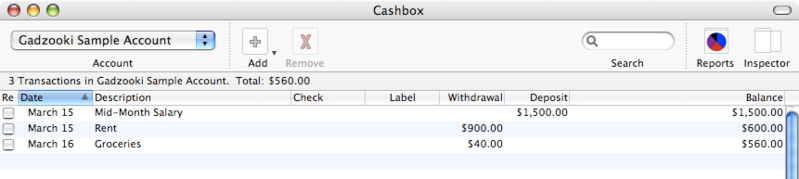
If you want Cashbox to work with more complex operations, like debiting your expenses from your cash influx, you could make a kludge with the Deposit and Withdrawal fields. You can put in your cash influx in the Deposit field, then your expenses in the Withdrawal field. Say you make an entry of your mid-month salary on the Deposit field, then you add your expenses in the Withdrawal field. The total would automatically show what is left of your money, if you recorded everything to the very cent, that is.
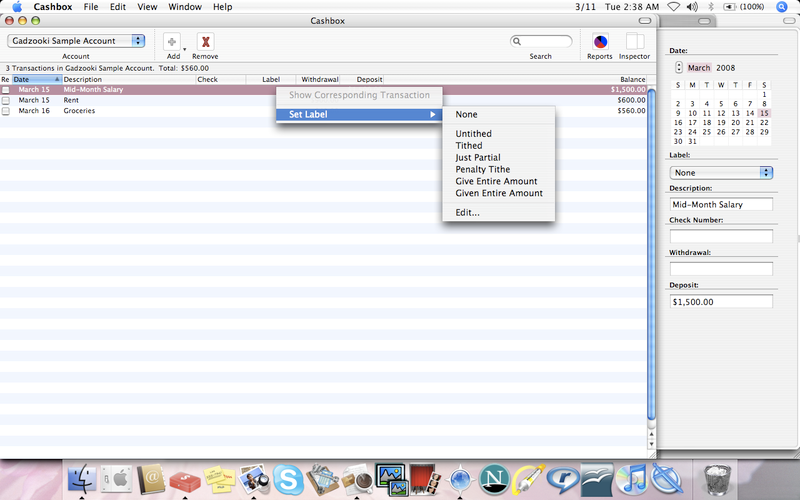
You can also edit your labels: just right-click the Labels field and click “Edit…”, way down at the bottom of the fields (illustration). I think the original intention was to indicate the status of the accounts, whether it’s been transferred or whatever, but I edited them to show whether or not I’ve tithed my money. 🙂 To each his/her own. 🙂
There are other features, and if you are on a Mac, and you need something a lot simpler than OpenOffice Calc or MS Excel, you’re wasting time not downloading Cashbox!