ss_blog_claim=aca0c385207e09c2d1e7b0055aed52bd
May 31 2007

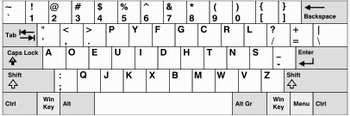
dvorak-keyboard.JPG

I’ve been hearing about the Dvorak keyboard for quite some time already, but the recent post by Matt Mullenweg got me intrigued once again. In fact, it has led me to a stage of geeky near-obsession that if I were not preparing several last-minute essays and thus heavily using my QWERTY keyboard, I would’ve tried to rearrange my laptop’s keys.

Basically, the Dvorak keyboard layout supposedly makes for faster and more efficient typing. From the reactions and opinions I’ve read, though, it seems you’ve got to be patient when converting to Dvorak from the good ol’ QWERTY. I do like the arrangement of the vowels!

Does anybody out there use Dvorak? I’d very much like to hear your experiences. As soon as I finish this insane stretch of cramming essays, I’m convincing myself (yes, I am still convincing him!) to try Dvorak. Heck, if I get lazy, I’ll just buy a new USB Dvorak keyboard and plug it into my laptop.
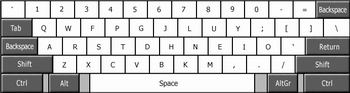
colemak-layout.png

Another QWERTY alternative I’m looking into is Colemak, which according to some sources improves upon Dvorak, and therefore is the best of the three layouts. Right now, I am more comfortable staring at the Dvorak layout, but only a few hours spent with both alternative layouts will tell which is better for me. Again, anybody there who cares to share their Colemak experiences?

If you’re interested in how these three layouts match up against each other, check out this comparison tool. It’s a Java applet that measures the approximate distance in meters that it takes to type in the text, among other stuff.

From time to time, it’s good go against the flow, and that’s one reason I want to try these two. It helps that both have some big names as advocates!

Share and Enjoy:

  • Twitter
  • Facebook
  • StumbleUpon
  • Digg
  • del.icio.us
  • Reddit
  • email
  • Blogosphere News

Related Articles

Comments (27)

27 Responses

  1. Fire Eye'd Boy

    31|May|2007

    In my Windows 98-era PC, I actually switched the Dvorak keyboard setting on, manually mapped out the keys in Word to check which buttons result to which characters, and to top it all off, rearranged the physical keys and put them back, even printing out the new characters and taping the printout over each key. The keyboard didn’t look pretty at the end of that experiment – the edges taper off differently and you end up with what looks like a mob of heads in all different directions – not to mention I wasn’t patient enough to learn a new way of typing altogether

  2. J. Angelo Racoma

    31|May|2007

    Dvorak? As in John C.? :P

  3. benj

    31|May|2007

    You did that FEB?! What?! haha

  4. Fire Eye'd Boy

    31|May|2007

    im a nerd. what can I say

  5. Mr Butterscotch

    01|Jun|2007

    Of course, the reason that keyboard inefficiencies exist is all down to the humble typewriter. Typewriters had the keys in certain places to limit typing speed so the keys didn’t mash and get caught up. On an electronic device of course the only real limitation is the human finger speed!

    As much as these ideas come and go, I really don’t think we’ll see another keyboard design take hold. If just because a lot of schools now teach touch-typing…

  6. Fire Eye'd Boy

    01|Jun|2007

    ^ on top of that, the QWERTY layout was such because early manufacturers wanted their salesmen to easily demonstrate the then-new typewriters by putting all letters of the word “TYPEWRITER” on the first row. Spiffy, but unfortunately now, the beast has been unleashed and not a lot of people are willing to re-learn their keyboards, myself included

  7. Geo

    01|Jun|2007

    Old time touch typists like me will have a hard time switching to DVORAK or Colemak. Just thinking about typing in those keyboards already confuses me. X_@

  8. W.E.

    07|Jun|2007

    I am a medical transcriptionist, more than 25 years/8 hr/7 days most weeks, with painful hands, elbows, back and shoulders for the last 10+ years. Finally a diagnosis of carpal tunnel syndrome and not wanting surgery convinced me to try Dvorak. I have been at it full-time now for 3 months and finally matching the productivity I had pre-Dvorak. The transition was slow and difficult, had me questioning my sanity, cursing myself, and wishing I were 25 years younger when taking on such a change. I did invest in a hardwired Dvorak keyboard (Tpyematrix) and I think that made the transition a bit easier.

    I ran across information about the Colemak layout but after I had made great strides with Dvorak. Oh, how I wished I had run across it before taking on Dvorak – not to have to relearn the whole keyboard, the common Ctr+Z,X,C,V in the same location, etc. However, after giving thought through my transition to Dvorak, I am convinced the difficulty transitioning to Colemak would have been just as difficult as the most difficulties I had were with those keys that were moved very close/right next to where they were originally. So I am sticking with Dvorak, now that I have learned it.

  9. J. Angelo Racoma

    07|Jun|2007

    I’m okay with my QWERTY keyboard. I’ve always had faster than average typing rate (ever since I was about ten years old). I don’t necessarily equate productivity to a faster typing rate, though. Typing fast is efficient, but not necessarily productive, especially in fields where creativity is a big factor.

    My mind can still think faster than my fingers can type. :)

    And then of course, being mostly a user of laptops, I couldn’t just switch to another keyboard layout easily!

  10. Justin

    09|Jun|2007

    The dvorak keyboard was designed for touch typing. I would suggest that you do not go through the hassle of rearranging your keyboard. Leave it as qwerty, that’s what most of the rest of the world does. What I did, was I printed up a picture of the dvorak keyboard and put it up near my monitor (there’s a good one on wikipedia)

    I found that my typing speed did not neccessarily go up, but I feel much more comfortable when using the Dvorak. If you would just use it for a couple of days, you will understand what we mean by that. Typing in English, about 60% of your keystrokes will land on the home row. That’s compared to 30% with qwerty.

    The copy and paste shortcut keys are probably one of the biggest things that annoyed me with the change. Since they are obviously tied to the qwerty keyboard, they come out all funny in Dvorak. Initially, I used the mouse a lot when I needed to copy and paste. Later, I would select the text, right click, and hit “C” (where the ‘i’ is on qwerty). Keyboard shortcuts are a wonderful thing, but they CAN be relearned.

    I learned about Colmak too late to switch, but I don’t think that it is as widely supported as the Dvorak layout.

  11. Ak

    16|Jun|2007

    I’m one of the few people who actually use Colemak (despite its mildly ridiculous name). I had had a go at Dvorak at some point but abandoned after a couple of weeks; I then learnt about Colemak and stuck to it… I think I started 4 months ago or so and though I probably haven’t yet got my QWERTY speed back, my accuracy and comfort improved dramatically. I can only encourage you to try it; the only problem with it I can foresee is that it is not as widely supported as Dvorak – but then the more of us use it, the more widely it will be supported in the future. This being said, for me a key benefit of Colemak over Dvorak is the ease with which I can type in other languages, notably French, and cross-platform consistency.

    One thing that I wish I had done more during my transition phase is typing-focussed training – using programs or even games, Typing of the Dead being the cult one – rather than just hoping that my speed would improve by itself (which it did but after weeks of frustration!).

  12. winsly

    10|Sep|2007

    hey

    ive been using the dvorak keyboard for some time now. compared to the qwerty comfort is one thing i do find desirable on the layout. it was a pain to re-learn typing and all especially for someone like me who visits the forums regularly. i remember composing a reply to a post for a full 20 minutes of key hunting.

    ive grown familiar and i guess numb on some of the physical pains i felt while using the qwerty layout (wrist pains, fingers going crazy on me) and lately doing the same volume of typing on the dvorak keyboard never really gave me any stress or any physical pain on my hands until now. very comfortable if i do say so myself.

  13. Craig

    03|Oct|2007

    I was a reluctant Qwerty typist for 30 years, having never taken formal typing classes when I was in school but having used computers starting with a Radio Shack TRS-80 and Commodor PET computer in High School (the school had one of each). So last December, I decided at the age of 45 it was time to improve my ability to type as fast as I was thinking in a more comfortable manner. I started with Dvorak because that was what was already available on my computer. After three weeks, I was not loving the layout. I hated where the punctuation was and I hated all the work my right pinky was doing to reach the L. My right pinky was definitely overworked and I found the whole process slow going. Using previous favorite shortcut key combinations was unpleasant also with Dvorak. In frustration I did some serious looking around the web and that was when I found Colemak. Looking at the layout, the reasoning behind the layout, and the availability on all major OS platforms, convinced me to drop Dvorak and switch to Colemak. From the beginning, I found I really liked the layout even while slowly working to learn it. In both cases, I practiced without looking down at the keys. I had matched what I had achieved in Dvorak in a week with Colemak (20 wpm) and it felt much more comfortable. Within a month I was hitting 40 wpm with high accuracy. Now 9 months later, Colemak is all I use. I love it. Never going back to Qwerty. I type much faster and far more comfortably in Colemak than I ever did in Qwerty. With Colemak, I am reaching my goal of typing as fast as I am thinking.

  14. Vu

    10|Jan|2008

    I managed about 100 words-per-minute using Dvorak, but ultimately gave it up in favor of Qwerty. It’s true that Dvorak more evenly distributes the work load between both hands, but this cripples your ability to go one-handed. (Bad for games.) Additionally, it places too much emphasis on the weak fingers. I couldn’t stand the placement of the “s” and “n” keys. These are common letters, yet they were placed awkwardly and presumably for that oft-touted drumming motion. (In my experience, that drumming motion happens just as often with Qwerty.)

  15. Wonderbird

    28|May|2008

    It took me a long time to switch from more than 20 yrs of typing QWERTY to DVORAK. It took several months of frustration to get back to being productive under DVORAK. I do not regret it at all and dread having to use QWERTY when working on someone else’s computers. Almost a year later I am still forming patterns of words with the new layout. Overall I feel more relaxed and comfortable after a long day of keyboarding than when I was using a QWERTY layout. It is well-worth the effort but switching is NOT easy… (On the bright side you can tease colleagues about being stuck in the 1800s!)

  16. bharat

    20|Nov|2008

    I have typed in qwerty for 9/10 yrs until I encountered Dvorak and Colemak fews months back, but I prefered Dvorak over Colemak after doing analysis. I Love the smooth typing on Dvorak its way comfortable and why not prevent RSI & CTSyndrome ?

  17. Simon

    04|Dec|2008

    I have been a 40 wpm qwerty non-touch typist for most of my life, but recently decided that it was time to learn to touch type. In my regular job as a programmer, touch typing isn’t too much of an advantage I think – programming uses a lot of odd characters, and you’re generally limited by the speed at which you can design code more than anything else. However I’ve started doing much more collaboration using online chat in recent years, and my speed and accuracy is much slower than that of touch typers.

    I looked into all the major alternatives. Dvorak was a candidate, of course, but come on! It was designed back in the 1930’s, when keyboards were rather different than they are today. I don’t think Dvorak’s famed inward rolls or hand alternation are nearly as important on an electronic keyboard as they were on a mechanical typewriter that required a lot more finger strength and motion.

    There are a few other options out there, with Colemak probably being the next most popular. There’s also the rather similar Asset keyboard, and the rather strange BULKPM which claims great things but I think their metrics are a little off.

    Overall, I think Colemak has just about the best ergonomic layout I’ve seen, and does this while retaining many keys in their QWERTY positions. It has no serious flaws anyway, though one could argue about things like whether the S and R should be switched to be closer to their QWERTY positions.

    Having said that, any of teh top three are contenders:

    - QWERTY if you want maximum compatibility with the rest of the world, and no transition problems.

    - Colemak if you don’t mind a little messing around to install the keyboard drivers (at least on Mac and Windows), and you want (just about) the best possible layout.

    - Dvorak if you want a layout that’s better than QWERTY in most cases, and has out of the box support on every major OS.

    BTW, I completely agree with an earlier poster – don’t bother switching your keycaps. You’re supposed to be touch typing! In fact, not moving the keycaps forces you to develop better touch typing skills.

  18. RaspSpeaply

    17|Dec|2008

    Hi people

    As a fresh http://www.gadzooki.com user i only want to say hello to everyone else who uses this forum :D

  19. Vowlyrala

    23|Dec|2008

    Could you suggest a virtual office service with the bigest country coverage and cheap call forward to office telephone which gives toll free number? I need the numbers in the USA, Venezuela, Hong Kong, India, Italy, Mexico, Panama, Singapore, Thailand, Croatia, Japan.
    ???

  20. apentetry

    23|Dec|2008

    Most peoples says that you need, other that you dont.
    I hope you help

  21. Slenrebrirumb

    28|Dec|2008

    Whats up everyone? I’ve lurked long enough! time to appear from the shadows and join in on the action.

  22. JoRDANA

    04|Feb|2009

    can you help me? I don’t know whay should i do
    i dont noob!

  23. Tim

    02|Jul|2009

    Dvorak user here. I just wanted to mention that there are alternative keyboard shorcuts for cut, copy, and paste.

    Cut: Shift-Delete
    Copy: Control-Insert
    Paste: Shift-Insert

    I use these more instead of Ctrl-X/C/V.

  24. Lisa

    17|Jul|2009

    I just switched to Colemak on my PC work computer but I can’t find out how to make it work on my home Mac. HELP!

    I have put the “Colemak.keylayout” file into my Library/Keyboard Layouts, but it’s still not working! GRRRRR

  25. Jak

    23|Aug|2009

    Really insightful replies.
    I’ve just started a data entry job. I’m in my early 20’s, and have spent most of my life with QWERTY.
    I stumbled upon Dvorak and Colemak a couple days ago, from these reviews I think I’ll turn my attention to Colemak over Dvorak.
    Thanks

  26. ethana2

    20|Oct|2009

    Colemak on Ubuntu. Comes with. Never looked back.

  27. George

    01|Nov|2009

    I tried Colemak for a about a month and it made my hand hurt. I switched to Dvorak and the pain disappeared. It feels great to to type with. When I used colemak, I found the key to key movements uncomfortable. I thought I just had to get used to it or maybe i wasn’t holding my hands right but nothing worked until I switched over to Dvorak.

    As for cut/copy/paste shortcut keys, I just changed them to better keys in my Mac’s system preferences. I don’t know how this would be done on Windows, but there’s probably some easy way to change shortcuts.


Leave a reply

Search Gadzooki


Our Features

Software and Security

Silverlight – Is This Going To Be Web 3.0?

It’s not that often when a technology comes along that leaves me amazed. You know, the sort of thing when you look at it you think “wow, this is good. Not just good, but perhaps is going to make a difference to websites in a very real way in the near future”. [...]

Read on
More Software Features

Hardware and Gadgetry

The CrunchPad is dead. Now what?

It’s dead, Jim.

And now, news of the CrunchPad’s demise has reached the blogosphere (twice-over, I must say), we’re here to examine the post-mortem. It was an ambitious project: an internet tablet meant to sell cheap. Everybody was waiting for it with bated breath, but it never came.

Read on
More Hardware and Gadget Features

Gaming

Sony reveals PlayStation Move

I have to admit, my mind is officially blown. Sony finally revealed its new PlayStation 3 motion controller at GDC 2010 in San Francisco, and boy is it looking good.

Dubbed the Playstation Move, the advanced motion controls on this baby makes it supposedly more accurate than that other motion controller from that little-known console from [...]

Read on
More Gaming Features

Automotive

Pagani Zonda R

The Pagani Zonda R is a truly awe inspiring car. With a price tag of about £1.3 million, this was always going to be a special motor. What made it even more impressive is just how tuned it is, the level of performance and technical specification is breathtaking. Here’s the official line [...]

Read on
More Automotive Features
GADZOOKI TEAM Official Sponsors


SUBSCRIBE


CATEGORIES

PARTNERS


FRIENDS

BLOGGING STUFF